
Claude connectors let Claude read and act in the tools your team already uses, such as Gmail, Google Drive, Slack, HubSpot and Microsoft 365. On a Team plan, an Owner switches each connector on, then every person signs in with their own account, so Claude reaches whatever that person can reach, which is often more than they realise. Give it read access first, then let it create things with someone's approval, and keep deleting blocked.
Treat Claude like a new hire: some access on day one, more once it's earned it. James McAulay teaches connectors in that order, and in his workshops each tool is connected read-only to start.
What does a Claude connector do?
A connector gives Claude access to one of your apps, so it can find information there and act in it. Claude reads your Google Drive, summarises a Slack channel or drafts a reply in Gmail, without anyone copying text into the chat. Connectors use MCP, the Model Context Protocol, and the ones in Anthropic's directory work on every Claude plan, including Free.
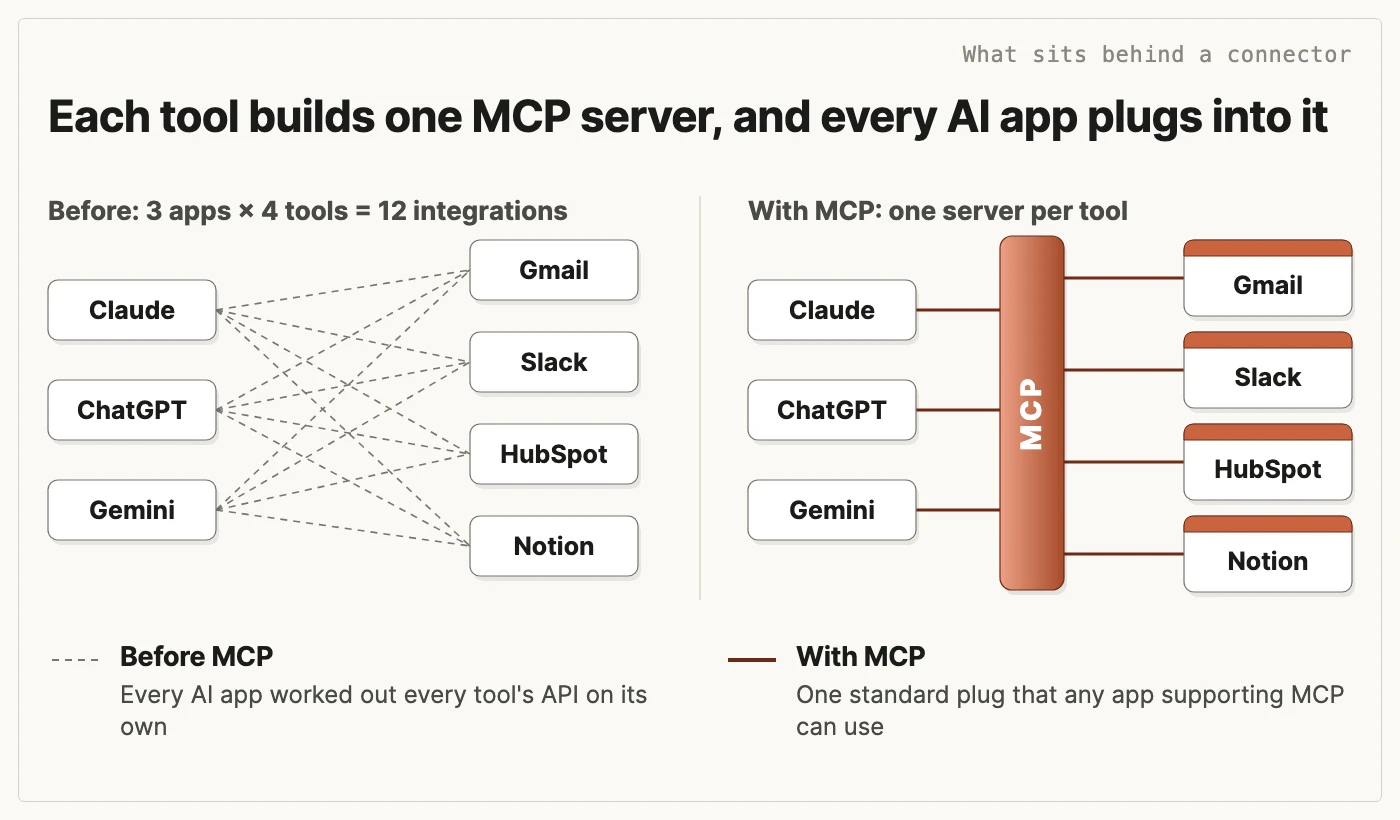
MCP is why one connector works in so many places. Before Anthropic launched it in November 2024, every AI app had to work out every tool's API, the way software talks to that tool, on its own, so three apps and four tools meant 12 separate integrations. Now each tool builds one MCP server, like a USB-C port, and any app that supports MCP can plug into it.
Which connectors should a non-technical team turn on first?
Start with the tools your team opens every morning. All of these are in Anthropic's connectors directory (checked 9 November 2026), marked "Anthropic verified".
| Tool | What Claude can do with it |
|---|---|
| Gmail | Draft replies, summarise threads and search your inbox |
| Google Calendar | Manage your schedule and coordinate meetings |
| Google Drive | Search, read and upload files |
| Microsoft 365 | Work in SharePoint, OneDrive, Outlook and Teams from inside Claude |
| Slack | Send messages, create canvases and fetch Slack data |
| Notion | Search and update your workspace |
| HubSpot | Bring CRM context into every answer and action |
The directory also lists Community connectors, which Anthropic screens but hasn't reviewed in depth, so check who built one before you add it.
People on James's Agent Accelerator course connect their most-used tools in week one. Harry Hetherton, Head of Strategy and Partnerships at VitaMojo, named connecting his email, Slack and Google Drive, and having Claude run scheduled actions with that context, as his biggest win. At Connectd, Jamie, the Head of Customer and Startup, linked HubSpot to Slack, so six account managers get the list of leads they need to chase every morning.
How do you set up connectors on a Claude Team plan?
On a plan without an Owner, such as Free, Pro, Max or Ultra, it's one step: in Customize, under Connectors, pick the tool, sign in and approve the access Claude asks for. On a Team plan it takes two people: the Owner makes the connector available, and then each person connects their own account.
- An Owner adds the connector for the team. In Organization settings, under Connectors, they browse the directory and choose "Add to your team". The connector is now available, but nobody has access yet. Before telling anyone to connect, the Owner sets its Tool permissions, as in the next section.
- Each person signs in with their own account. In Customize, under Connectors, they pick the connector, sign in to the tool and approve the access Claude asks for.
Then people switch the connector on in the chats that need it. Pilot it with two or three people for a week before opening it to everyone.
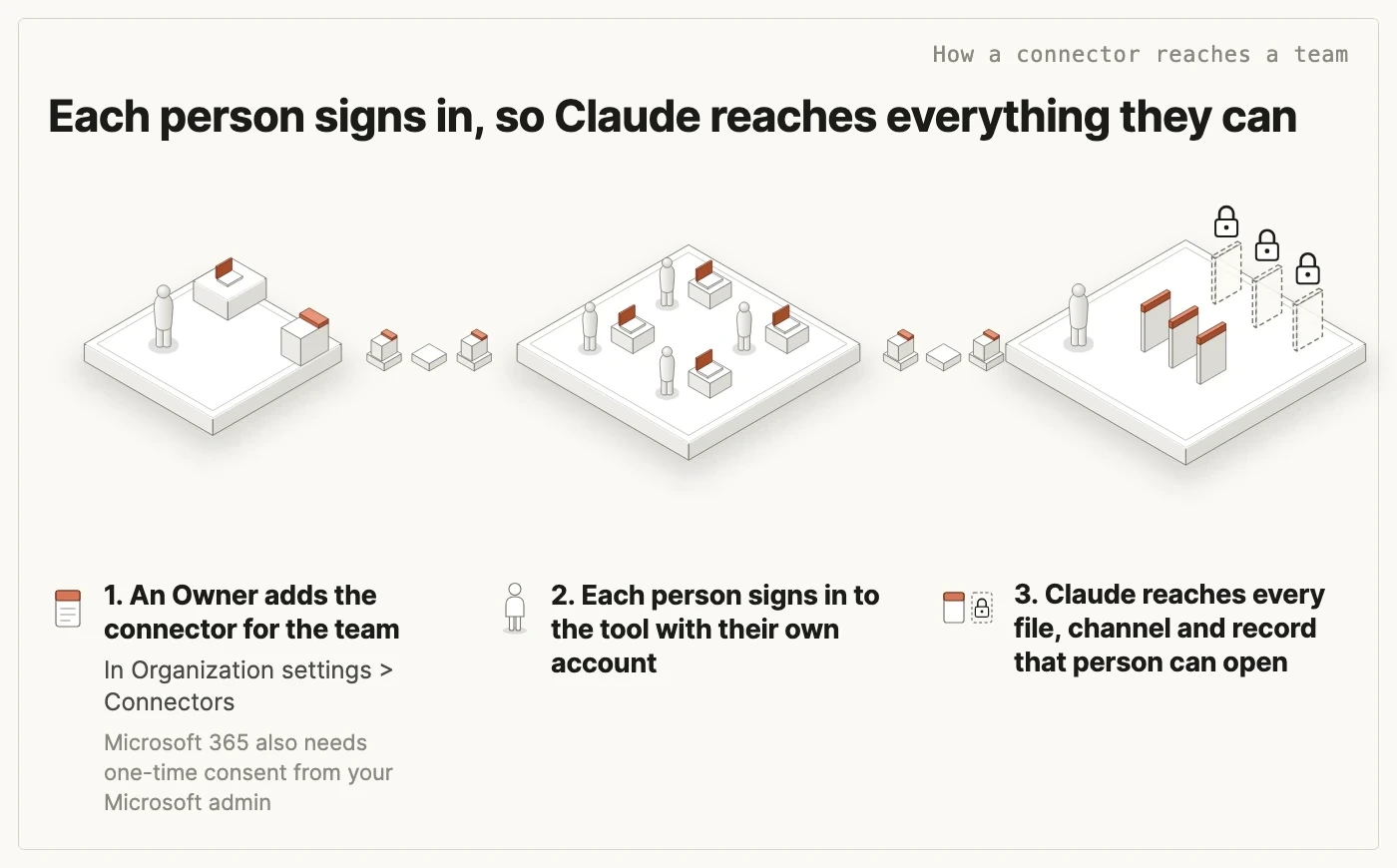
Microsoft 365 needs one more person. As well as the Claude Owner, a Microsoft Entra Global Administrator, the person in IT who manages your company's Microsoft logins, gives a one-time consent for your company's Microsoft tenant, and should read which permissions they're granting before they accept. The connector starts read-only: Claude can send email or change files only once write tools are approved and switched on.
Members can also ask for a connector the Owner hasn't added. This is on by default on Team plans and off on Enterprise until an Owner turns it on. The Owner can approve the request, decline it, or decline it and block that connector so nobody asks again.
Connect only what people will use. Each connector takes up room in a conversation, so once someone has 10 or more switched on, Anthropic suggests choosing On demand in a chat's Tool access menu. That setting applies to the one chat, and the default, Auto, already loads connectors as they're needed.
What should Claude be allowed to do in each tool?
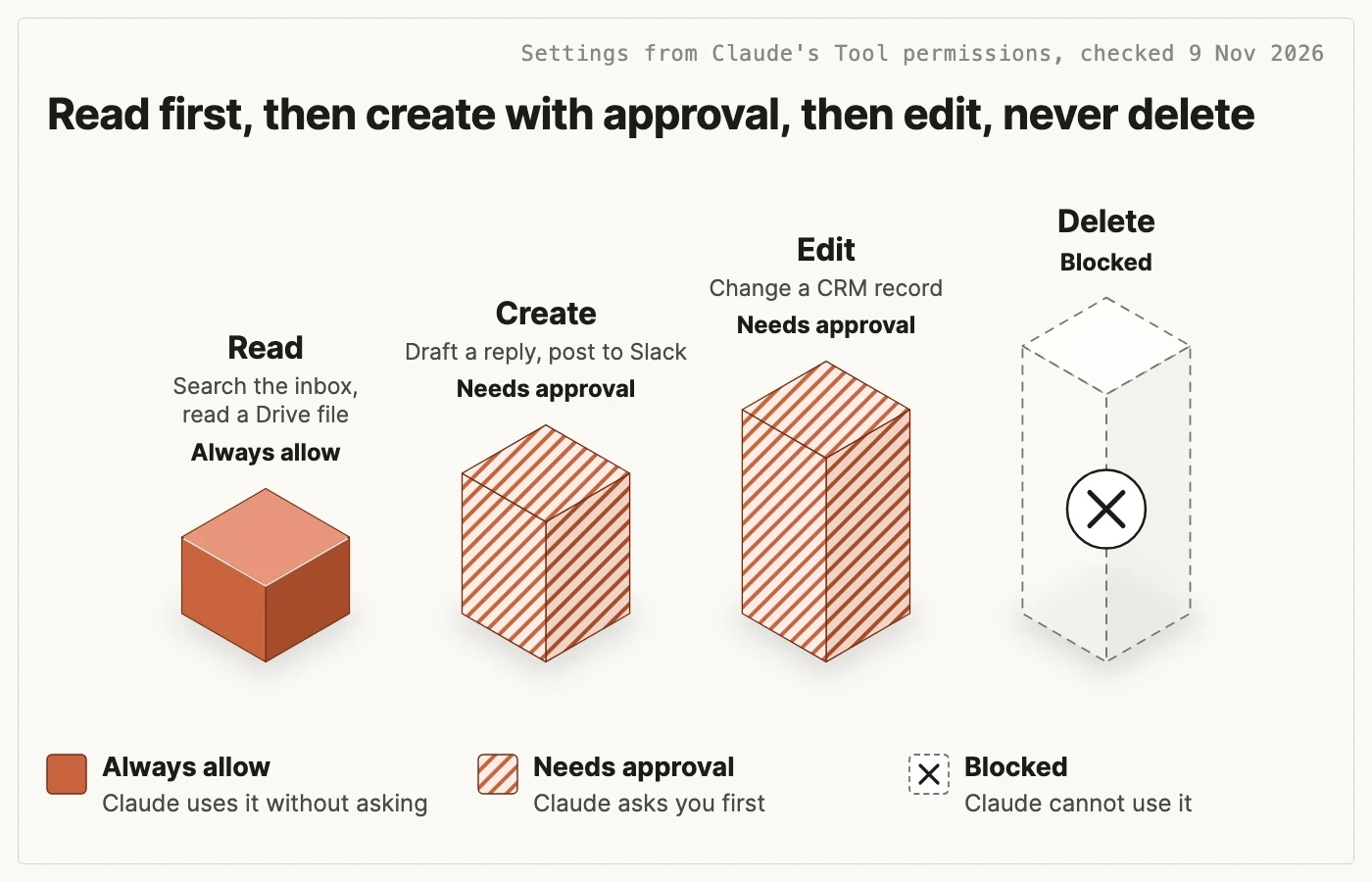
James teaches this as a ladder of trust: read first, then create with your approval, then edit, and never delete.
A Team plan lets an Owner set that ladder for the whole company. Under Tool permissions, each connector's tools are grouped by type, such as read-only tools and write or delete tools, and you can set each group, or a single tool, to Always allow, Needs approval or Blocked. Nobody on the team can override the Owner's choice. Where a connector puts write and delete tools in one group, you can set the group to Needs approval and block the delete tools one by one.
| Rung | What Claude does | Tool permissions setting |
|---|---|---|
| Read | Searches the inbox, reads a Drive file, summarises a channel | Always allow |
| Create | Drafts a reply, posts to Slack, adds a Notion page | Needs approval |
| Edit | Changes a CRM record or a shared document | Needs approval |
| Delete | Removes anything | Blocked |
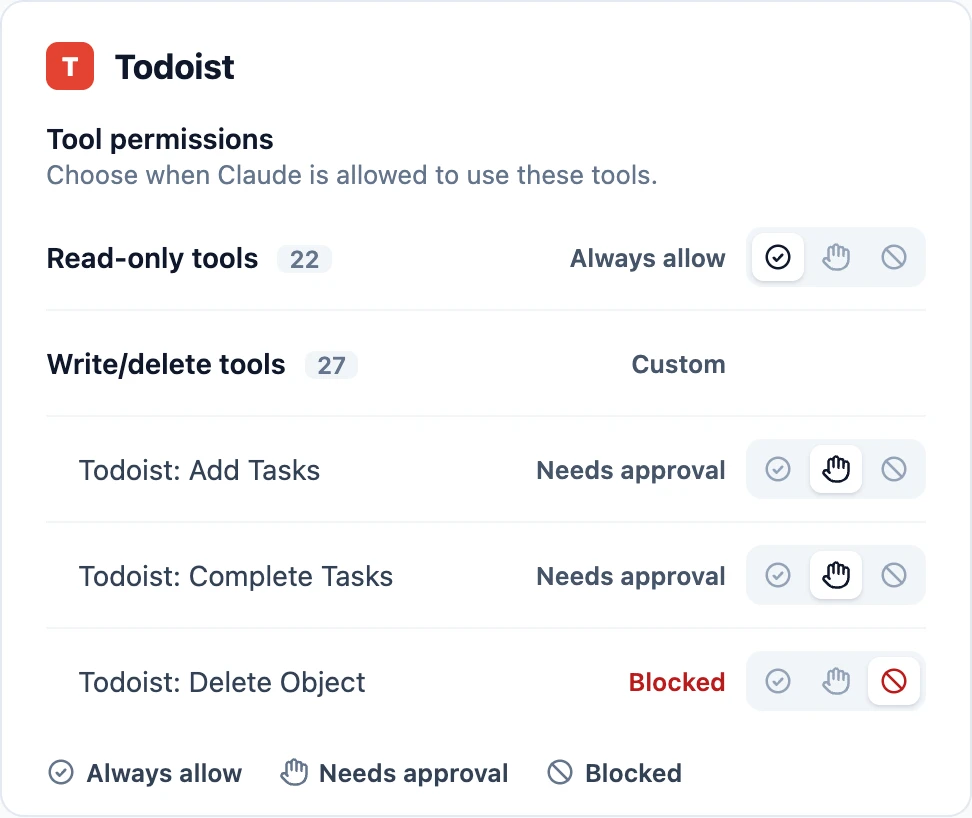
Each person sees the same settings in Customize, under Connectors, when they open a connector. Here it is for Todoist: reading is always allowed, adding and completing tasks needs approval, and the delete tool is blocked on its own. Custom means the tools in that group have different settings.
Rely on these settings rather than on instructions. Telling Claude "always check with me first" is a request it should follow, and in a long chat it can be lost. In February 2026, Summer Yue, Director of Alignment at Meta Superintelligence Labs, told her AI agent, OpenClaw, to confirm before acting; the instruction was lost when the long conversation was compacted, and the agent started bulk-deleting her email. A blocked tool stays blocked in that connector, but only there: a CLI, browser control or an API key reaches the same tool by another door, and Tool permissions don't cover them. Keep anything that runs on a schedule, with nobody there to approve, to reading plus the one action it exists for, such as posting to a single Slack channel, and never let it read email from strangers.
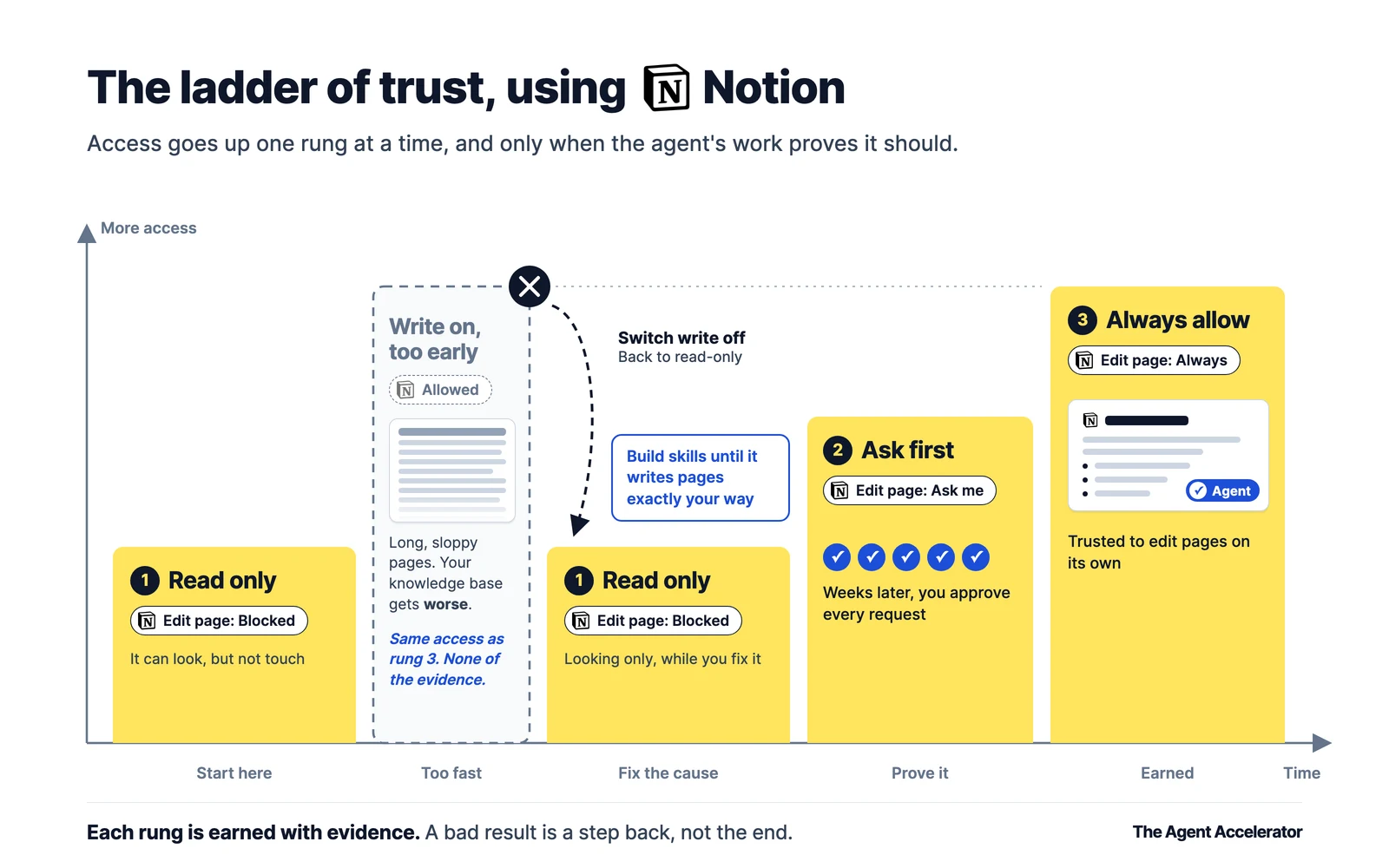
Don't switch the whole table on at once. Start every tool on Read, and move a tool up a rung only once the work you've approved has been right, the way a new finance hire gets read-only access to the accounts in their first week. The figure below shows the course's Notion example: edits switched on too early produced long, sloppy pages, went back to read-only while skills fixed the writing, then moved to asking first ("Ask me" is Needs approval) and, after weeks of approvals, to Always allow. Only promote tools that change your own workspace that far; anything that sends, shares or pays stays on Needs approval, however routine it feels.
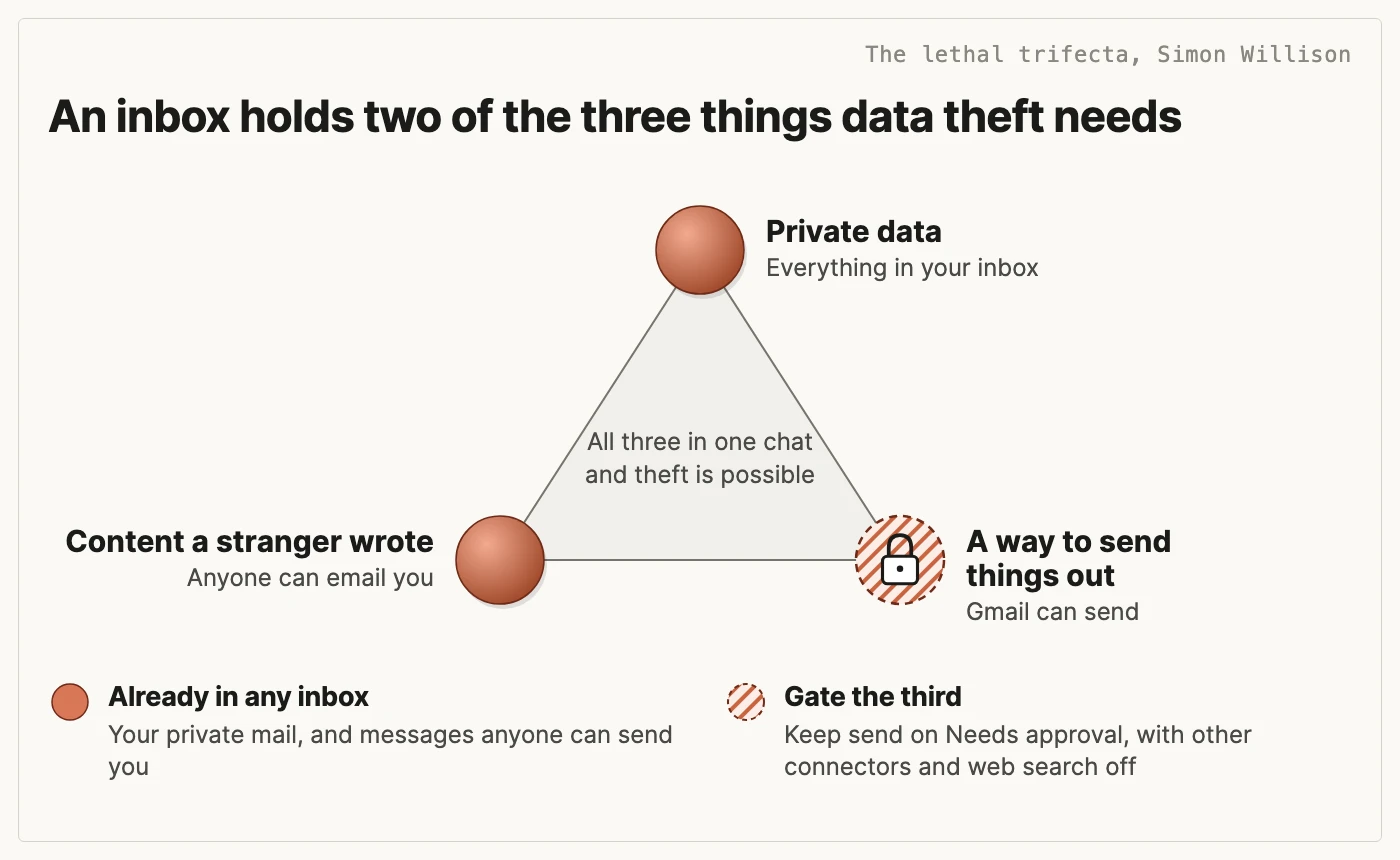
Email needs the most care. Simon Willison calls it the lethal trifecta: private data, content from strangers and a way to send things out should never be in one agent together, and an inbox already holds the first two. A stranger can hide instructions in an email, which is called prompt injection, and Claude may follow them. Gmail asks for approval before each send by default, and on a Team plan the Owner decides whether members can switch that off. Leave it on, read who a message goes to before you approve it, and in the chat where Gmail is on, switch off every other connector and web search, so a hidden instruction has far less to reach.
Strangers write more than email. Calendar invites, files shared with you, shared Slack channels, web pages and CRM records filled in from a web form reach Claude the same way, so treat anything from outside your company as untrusted wherever it appears.
For most people the safest choice is not to connect their main inbox at all. The course's advanced track shows people how to give the agent an inbox of its own instead. It holds far less private data, but anything you forward into it can still carry hidden instructions, so keep its address private and its sending on Needs approval.
What if a tool your team uses has no connector?
A tool with no listing in the directory can still be connected, in one of two ways.
| Route | What it is | Use it for |
|---|---|---|
| Custom connector | An MCP server added by its web address, which must be reachable from the public internet | A service on the internet with no directory listing |
| Desktop extension | A connector that runs on your own computer in the Claude desktop app, with your permissions | Tools and files that live only on your computer, such as local folders. What Claude reads still goes to Anthropic, as in any chat |
Anthropic hasn't verified the servers behind custom connectors, and it says to connect only to ones from organisations you trust. Popularity is no guide: a Google Sheets MCP server on GitHub with over a thousand stars was built by an independent developer, not Google. Check who built a server, read the permissions it asks for when you sign in, and decline anything broader than the job. Its author sees what Claude sends it and can change how it behaves later, so look at it again when it updates.
A desktop extension needs more scrutiny, not less: it runs with everything your account can do on that computer. Install only extensions from Anthropic's directory or your own IT team, and Owners can switch on an allowlist, which is off by default, to limit which ones people install.
At Connectd, people who aren't engineers built two custom MCP servers. Jamie needed a retention figure that meant pulling numbers from two separate databases by hand, so he wrote a custom MCP server that joins them and turned the job into one skill. "I had one team member who went from using a large language model as a search function, or to summarise text and emails, to building custom MCP servers within four weeks. Which is insane," says Roei Samuel, Connectd's CEO. Read the Connectd case study for what the rest of their leadership team built. A server like this holds a login to your data, so give it a read-only account limited to what it needs, and have someone technical review it before the whole team uses it.
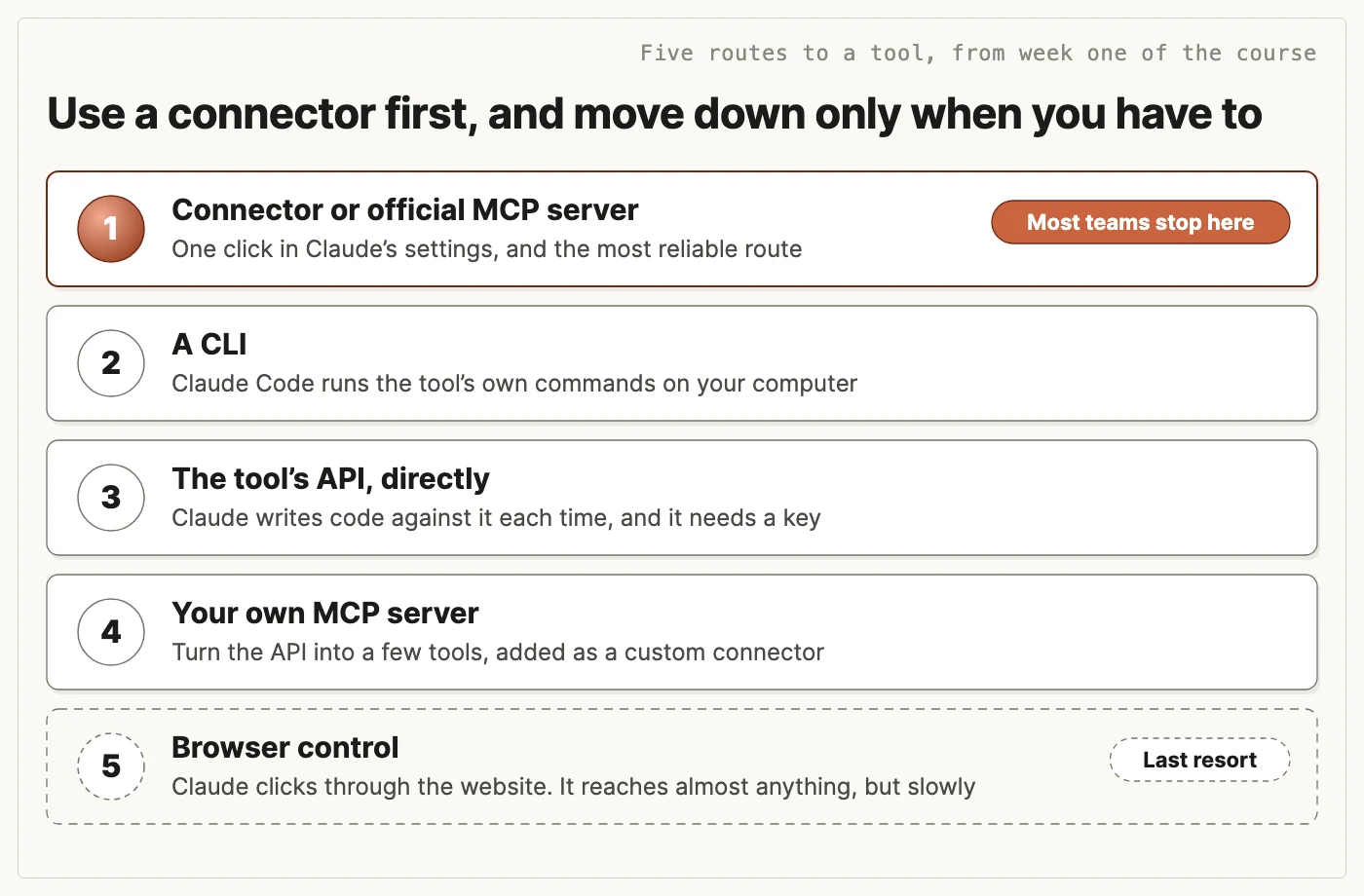
James teaches five routes to a tool, from a connector or official MCP server down to browser control, where Claude clicks through the website. Most teams never need to go past the first. A CLI is a tool's own typed commands, which Claude Code runs on your computer, and building your own MCP server is an advanced option on the course. Connector settings don't cover the CLI, API or browser routes: each is only as safe as the sign-in or key it uses. A key is a password, so never paste one into a chat, keep it read-only and narrow, and revoke it the moment it might have been exposed.
What will your IT lead ask before connectors go on?
Have these answers ready before you ask for the Owner's time.
| Question | Answer |
|---|---|
| Can Claude see more than the person using it? | Not through a directory connector. It inherits that person's permissions in each tool, and Tool permissions can only narrow them, so tidy over-shared files and channels first: Claude can find in seconds anything that person could have found in an afternoon. A custom connector that signs in with one shared credential reaches whatever that credential can. |
| Where does connected data go? | What Claude retrieves is stored on Anthropic's servers with the chat. Deleting the chat removes it from view at once and from Anthropic's systems within 30 days, unless it was sent as feedback or flagged under the Usage Policy. Each connected service also processes data on its own systems, under its own terms, so ask each vendor where it stores data. |
| Who can add a connector Anthropic hasn't checked? | On a Team plan, only an Owner can add a custom connector. Members can still install desktop extensions, including files from outside the directory, until an Owner switches on the desktop extension allowlist, which is off by default. |
| What happens when someone leaves? | Remove them from Claude, and also revoke their access in each connected tool, because each sign-in is a separate grant in that tool. Change any shared credential behind a custom connector. |
| Can we see what Claude did? | Check each tool's own activity history, where Claude's actions show up as made through that person's account, and ask whether your Claude plan includes audit logs. |
James sets connectors up with your team on the first day
A one-day private Claude workshop starts with setting Claude up: a second brain that tells it who you are and how you work, then connectors, permissions and skills. Teams connect Gmail, Google Drive, Slack, their CRM and whatever else they live in, and everyone leaves with working agents connected to their own tools. James has trained 700+ people from 250+ companies. See how the day runs on the Claude training for teams page, then book a 20-minute scoping call and James will tell you which format fits your team.
Questions teams ask about Claude connectors
Can Claude connect to Outlook?
Yes, through the Microsoft 365 connector, which also covers SharePoint, OneDrive and Teams. On a Team or Enterprise plan your team signs in with work accounts, which need a one-time consent from a Microsoft Entra Global Administrator, usually someone in IT. A personal Microsoft account covers Outlook and OneDrive only, needs no admin setup, and isn't offered on Team and Enterprise plans.
Do Claude connectors work in Cowork and Claude Code?
Yes. Connectors work in Claude on the web, Cowork, the desktop app and the mobile app. On a paid plan, the connectors you add on claude.ai are also available in Claude Code, in the terminal and in cloud sessions, when you sign in with your Claude account.
Does Anthropic train its models on connector data?
On Team and Enterprise plans, Anthropic doesn't train on your chats or connector data by default. The exception is a chat someone sends as feedback with the thumbs buttons, and an Owner can switch that off with the Rate chats setting, in Organization settings, under Data and Privacy. On consumer plans Anthropic says it doesn't train on raw content from connectors, but if someone has opted in to training, anything copied into the chat, and Claude's answers that quote connector data, can be used.
What is the difference between a Claude connector, MCP and an API?
They are layers of the same thing. An API is the way every tool lets other software talk to it. MCP, the Model Context Protocol, is a standard wrapper around that API, so any AI app that supports MCP can use the tool. A connector is a ready-made MCP connection that Claude sets up for you in a few clicks.
Why has my Claude connector disconnected or stopped working?
Connections can drop when a sign-in expires or your IT team's security policy asks people to sign in again. If it keeps happening, ask IT whether a sign-in policy is the cause. If Claude says a connector isn't available but you can see it switched on, reconnect it in Customize, under Connectors, and start a new chat. For a custom connector, also check the server is reachable from the public internet, because Claude connects to it from Anthropic's cloud, not from your computer.
How do I add a custom connector or any MCP server to Claude?
On Free, Pro, Max or Ultra, go to Customize, under Connectors, choose Add, then Custom, then Web, and enter a name and the server's MCP address. Free plans get one. On a Team plan only an Owner can add one, in Organization settings, under Connectors, and each person then connects to it with their own account. The server must be reachable over the public internet, and Anthropic hasn't checked it, so only connect servers from organisations you trust.
Do Claude connectors use up my usage limits?
They can. Anthropic says tools and connectors are token-intensive: each connector switched on takes up room in a conversation, and that counts towards your usage. Switch on only the connectors a chat needs, and if you have 10 or more on, choose On demand in that chat's Tool access menu so Claude loads them only when a request needs them.
What should we do if Claude does something it shouldn't?
Disconnect the connector first, in Customize, under Connectors, or ask your Owner to remove it for the team. Then revoke Claude's access in the tool itself, such as your Google account's third-party access page or Slack's app settings, change any password or key that may have been exposed, check the tool's own activity history for what changed, and tell anyone affected. Do the same revoke step when someone leaves the company.
Tagged: claude, claude-connectors, ai-agents