
Copilot Cowork isn't free. It needs the Microsoft 365 Copilot licence, then each task is billed on top in Copilot Credits: Microsoft estimates 100 to 300 credits ($1 to $3 at $0.01 a credit) for a light task and over 700 for a heavy one. Cowork plans a job and does it across Outlook, Teams and your Office files, but nobody can use it until IT adds them to a group with a spending policy, where the limit is set.
Is Copilot Cowork free?
No. Cowork needs a Microsoft 365 Copilot licence, and then every task is billed on top of it in Copilot Credits, on Business and enterprise plans alike. The licence is a separate charge per person, and the Copilot pricing calculator shows it in pounds for your team.
Microsoft prices credits in US dollars. Pay-as-you-go is $0.01 a credit, according to Microsoft's Cowork launch post, and a prepaid plan gets a discount for committing to a volume in advance. Prepaid credits are spent first.
There's no fixed price per task. Microsoft works it out from four things: how much work the model does, the emails and files Cowork pulls in, the tools it uses, and how long it runs. People see what each task costs while it runs.
To budget before anyone has run a task, start from Microsoft's planning estimates, which sort Cowork tasks into three sizes, each with an example. Microsoft calls the figures rough, and the dollars are at $0.01 a credit:
- Light: 100 to 300 credits ($1 to $3)A status update for your team every Monday, with your priorities and the week's executive meetings from your calendar.
- Medium: 300 to 700 credits ($3 to $7)Prep for a customer meeting: emails, calendar items and recent files pulled into a briefing doc, a sales overview in Excel and a client-ready presentation.
- Heavy: over 700 credits (over $7)Six months of exported product usage data analysed into a report for leadership.
Because the price grows with the files Cowork pulls in and how long it runs, attach the file or give Cowork its link rather than asking it to find the file. Scheduled tasks, and tasks that start when an email arrives, run without anyone starting them, so check how many credits they use in the first few weeks.
How do you get Cowork in Copilot?
Only an admin can give someone Cowork, through a spending policy that names it. Your IT admin first turns on usage-based billing for Copilot, and creating the policy needs a Global Administrator or Billing Administrator. Then it takes two steps and one decision:
- Put the people who'll use Cowork in a security group in Microsoft Entra ID, and make sure each of them has a Microsoft 365 Copilot licence.
- In the Microsoft 365 admin centre, go to Copilot, then Cost Management, and create a spending policy for that group with Cowork selected. Choose a billing method and a limit per person: pay-as-you-go bills an Azure subscription, which is created automatically if you don't have one.
The decision is whether to allow Claude. In the UK, Claude models in Microsoft 365 Copilot are off by default, and an AI Administrator or Global Administrator can switch them on, though they currently sit outside Microsoft's EU Data Boundary and, where they apply, its in-country processing commitments, so check this with whoever owns data protection. With Claude off, Microsoft says Cowork keeps working on non-Anthropic models such as GPT.
Microsoft's lowest limit is 2,000 credits a person a month, which is $20. In a test account set up on 17 November, the limit started at "No limit" and the setup screen suggested 2,500 credits, so set one on purpose.
For a pilot, 2,500 credits ($25) a person covers roughly three to eight meeting preps at Microsoft's medium estimate, if nothing else uses credits. Once someone reaches the limit, they lose access until credits reset on the 1st of the month, although Microsoft checks the limit with a delay, so one or more tasks can still start. After the first month, look at what people actually used and raise the limit for the heavy users.
Here is a policy at Microsoft's lowest limit, 2,000 credits:
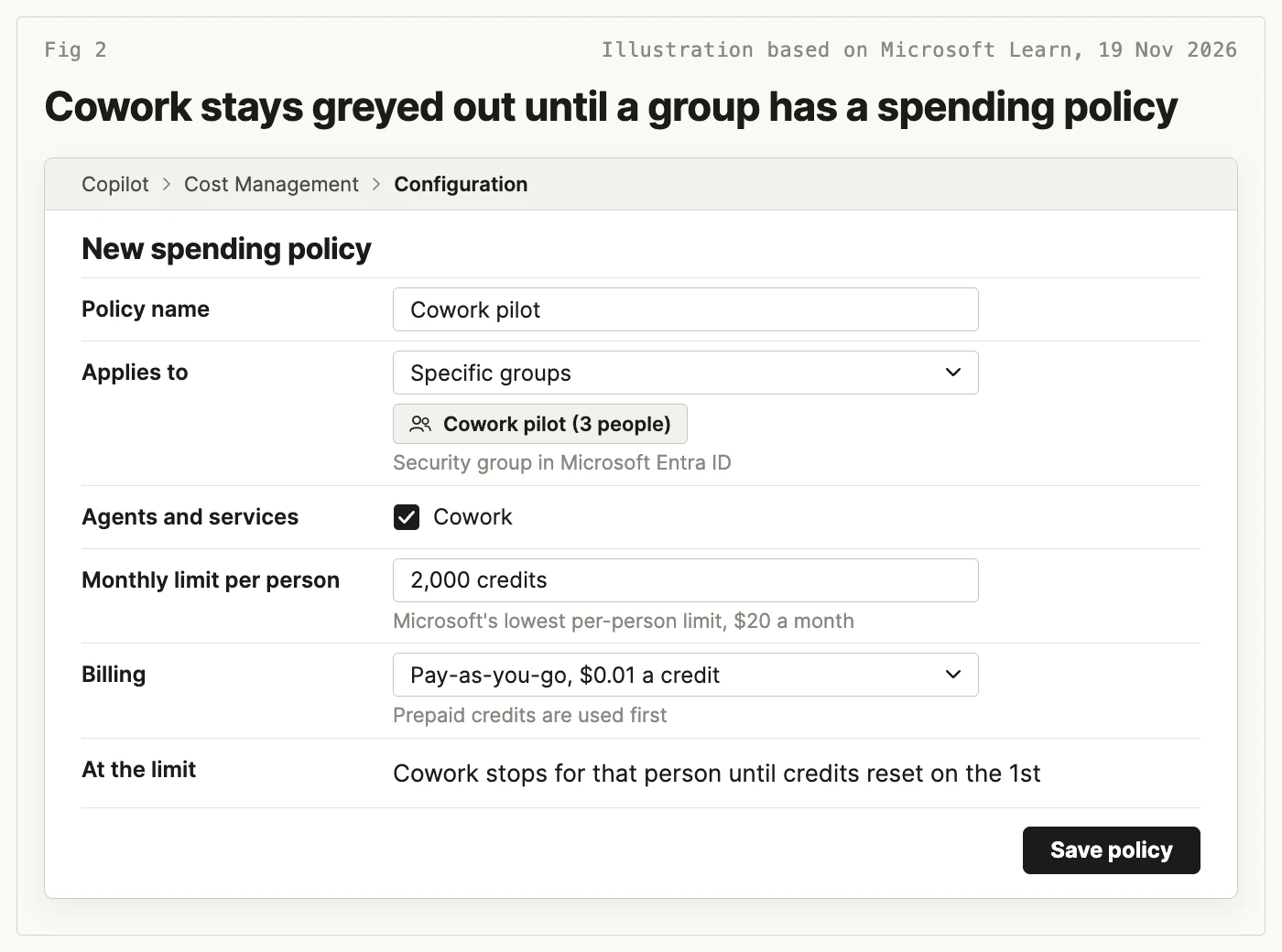
Until someone is in the group, Cowork still sits next to Chat in the Copilot app with a button to request access, and the admin can only approve the request by adding them to a group that already has a spending policy. Once they're in, Cowork works in the browser at copilot.cloud.microsoft, in Outlook and Teams, and in the Microsoft Copilot desktop and mobile apps.
What is Microsoft Copilot Cowork used for?
Copilot Chat answers inside one conversation. Cowork plans a job and carries it out across Outlook, Teams, Word, Excel, PowerPoint and your OneDrive and SharePoint files. By default it asks you to approve each action, such as sending an email or posting in Teams, though people can choose to always allow an action.
A job someone runs every week can become a skill, a SKILL.md file in their OneDrive that tells Cowork how the job is done, in the same format Claude uses. You can have up to 50, according to Microsoft's Cowork FAQ.
If Cowork writes four pages when you asked for five bullets, its custom instructions are where your role, audience and format go: write them once, up to about 3,000 words, and Cowork applies them to every task.
Should your team use Copilot Cowork or Claude Cowork?
If your team can get Claude, use Claude, every time. The product is better, it does more, and building agents in it is much easier. Two limits in Copilot Cowork show up on day one: it can't open files stored only on your laptop, and in the UK its Claude models stay off until IT switches them on.
Copilot Cowork is for teams that can't get Claude, usually because Microsoft 365 Copilot is the only AI their company allows. For them, it puts agents to work inside the email, meetings and files the team already uses.
Anthropic merged Claude Cowork into Claude's chat from September 2026, starting with the Pro, Max and Ultra plans, and it's now on Team and Enterprise too. Both use SKILL.md files for skills, so what your team learns writing one carries over if you switch.
A Copilot workshop turns each person's weekly task into a Cowork skill
The Copilot workshop for teams is built around Cowork. Before the day, your Microsoft 365 admin works through the steps above. On the day, each person writes the custom instructions Cowork reads before every task, then turns a task from their week into a skill Cowork can run each time the job comes round.
Agent Accelerator has trained 700+ people from 250+ companies, and everyone leaves the workshop with agents getting work done for them.
To start smaller, send two or three people on the Agent Accelerator cohort first. Its first chapter has a Copilot Cowork setup route, so they find out what your IT team needs to switch on before the rest of the team does the workshop.
Questions teams ask about Copilot Cowork
Can Copilot Cowork run a task on a schedule?
Yes. You can set up to 25 scheduled prompts that run on their own, such as a Monday summary of last week's client emails. Cowork can also start a task when a matching email or Teams message arrives, and by default those tasks draft the actions for you to approve rather than carrying them out. Because these tasks run without anyone starting them, check what they use in the first few weeks.
Can Copilot Cowork use files on my laptop?
No. Cowork can't open or edit files stored only on your device. Put the file in OneDrive or SharePoint, or attach it to the message if it's under 200 MB. It also can't read an encrypted file unless your account has the rights to view and extract its content.
Can Copilot Chat users use Copilot Cowork?
No. Cowork needs a Microsoft 365 Copilot licence on top of the Microsoft 365 plan, and the person has to be in a group with a Cowork spending policy. People on Copilot Chat alone can build simpler agents in Agent Builder instead, and the Agent Accelerator Copilot workshop covers that route for them.
Can we use Copilot Cowork with Claude switched off?
Yes. In the UK, Claude models in Microsoft 365 Copilot are off by default, and with them off, Microsoft says people with Cowork access keep working on non-Anthropic models such as GPT. An AI Administrator or Global Administrator can switch Claude on, but Claude models currently sit outside Microsoft's EU Data Boundary, so check that with whoever owns data protection first.
What happens when someone reaches their Cowork credit limit?
They lose access to Cowork until credits reset on the 1st of the month. Microsoft checks the limit with a delay, so one or more tasks can still start after someone reaches it. The lowest limit Microsoft allows is 2,000 credits a person a month, which is $20.
Tagged: copilot, team-rollout