
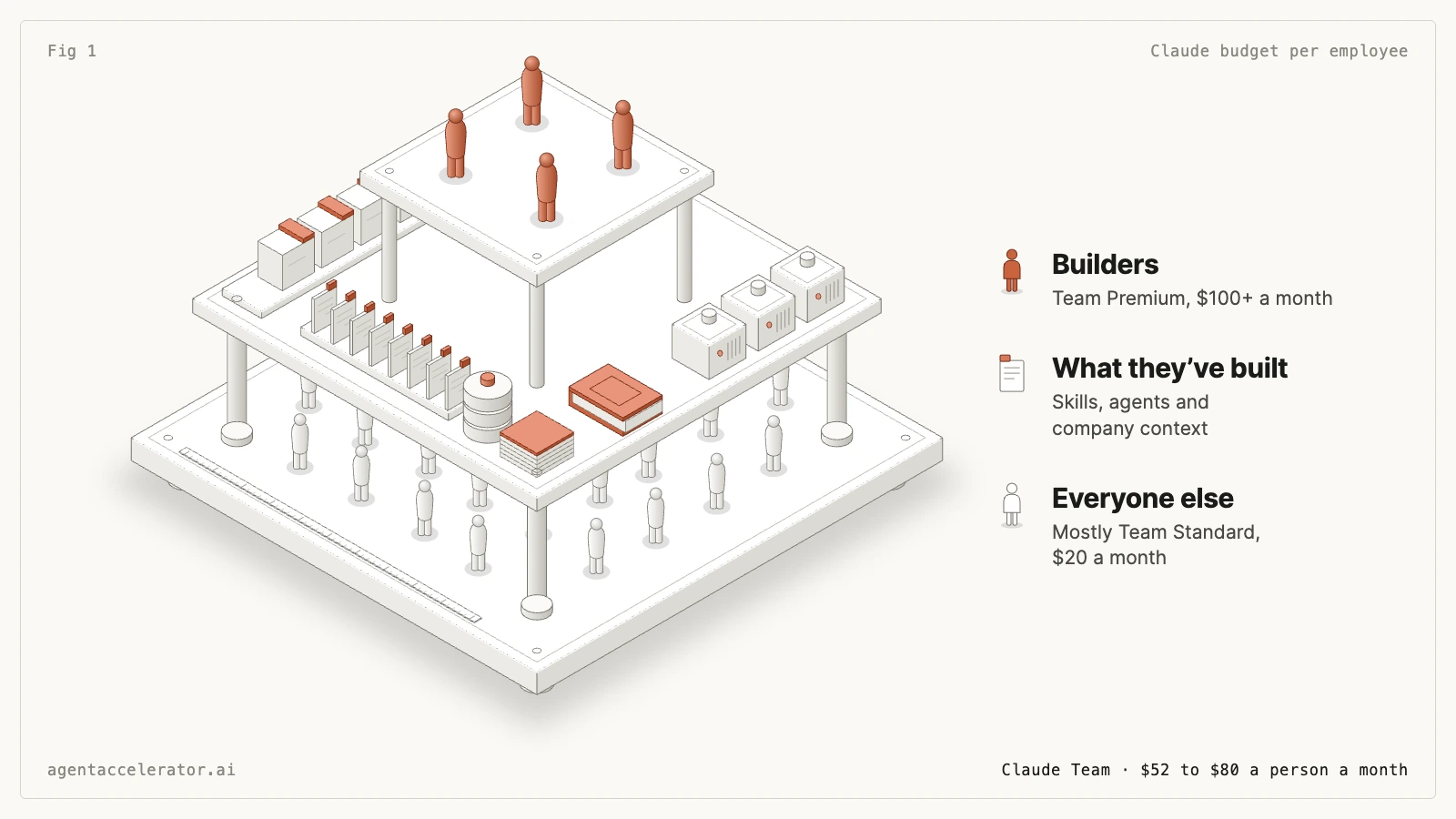
Split the company in two. Builders, who make agents and workflows, get at least $100 a month, and more once colleagues rely on what they have built. Most of everyone else can work on a $20 Team Standard seat once builders give them good skills and context; AI-native users who live in Claude all day need $100 too. Plan on $52 a person a month for seats, up to $80 with every extra-usage limit used.
A company's Claude bill depends mostly on how many people build with it. James McAulay, who has trained 500+ people across 200+ companies to build agents, plans every team's budget around two groups, because builders need several times the usage of everyone else. Start by naming one owner for the budget and picking your first builders: about 5 to 10% of the company.
Split your company into builders and everyone else
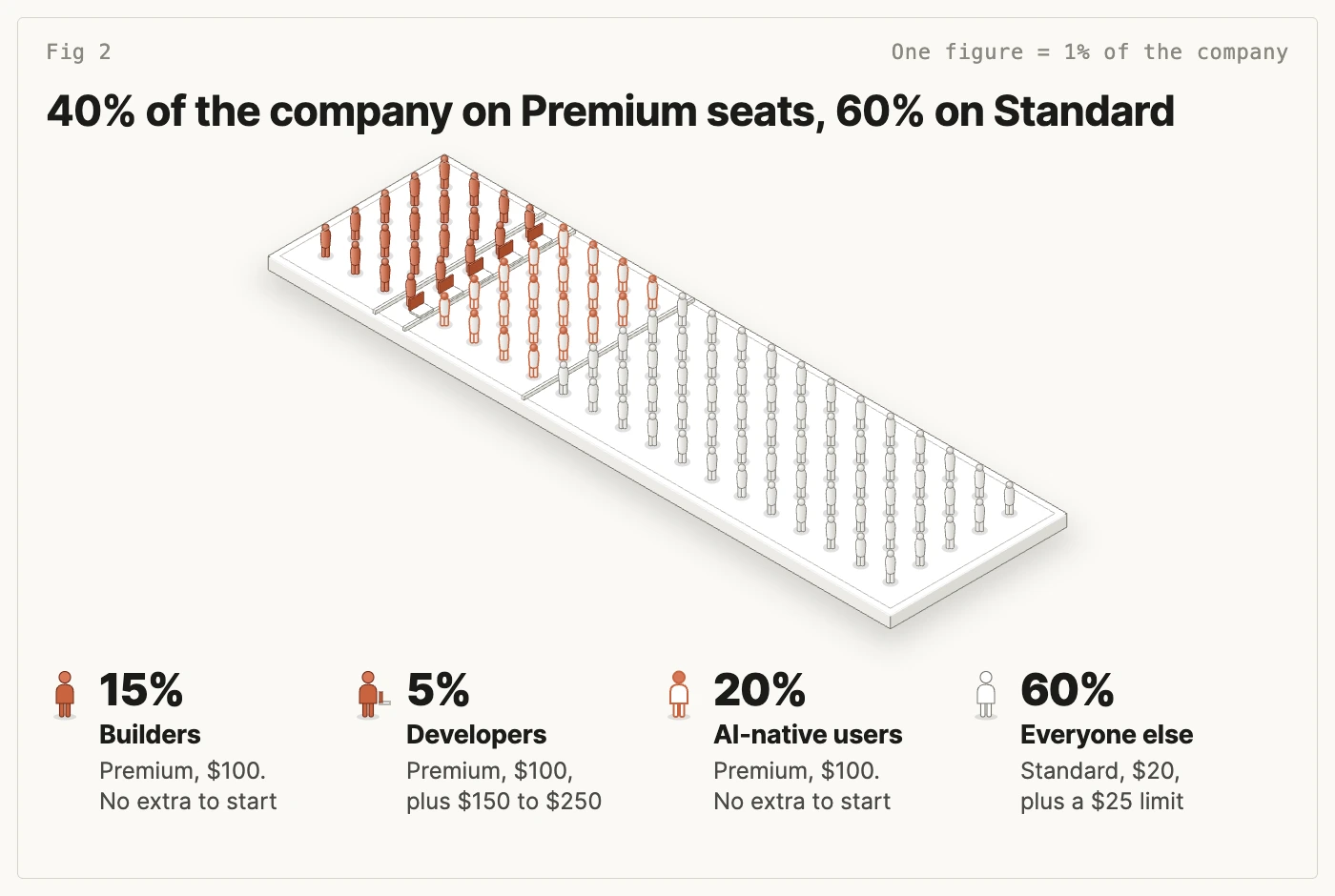
Builders make the agents, skills and workflows the rest of the company runs. Everyone else asks Claude questions, drafts documents and runs the agents the builders set up for them. About a quarter of everyone else, 20% of the company, are AI-native users: they work in Claude all day without building for others, and they need a bigger seat than the rest.
Give builders at least $100 a month
A builder spends hours at a time writing skills, testing agents and fixing what breaks. Budget at least $100 a month for each one:
| Builder | Seat on Claude Team | Extra-usage limit |
|---|---|---|
| Builds agents and workflows for their team (ops, finance, marketing, sales) | Premium, $100 a month | None at first: see what they use in month one |
| Builds with Claude Code (developers, data people) | Premium, $100 a month | $150 to $250 a month to start |
For the Claude Code row, Anthropic puts the average developer across enterprise deployments at "$150-250 per developer per month, with costs remaining below $30 per active day for 90% of users". On Team, usage credits only start once someone has used up their seat allowance, so the Premium seat covers part of that first. The extra-usage limit is a ceiling. Review it monthly.
Aim for about 20% of the company, one person in five, as builders. That's James's rule of thumb from training teams, not a published benchmark. The strongest companies he works with have gone past half, with most people able to automate parts of their own work. The builders become your AI centre of excellence: the people other teams go to when they want something automated.
Start with 5 to 10% of the company as builders
You won't have a fifth of the company building on day one. Start with about 5 to 10%, five to ten people in a company of 100, and choose them by what they already do, not by job title:
- Already buildsUses Claude or ChatGPT every day and has made something colleagues use, such as a custom GPT or a project with instructions.
- Owns a repeating jobRuns something every week or month, such as reporting or pipeline reviews.
- Has timeTheir manager will give them at least a few hours a week to build.
Put one person in charge of the list and the budget, usually the head of operations or the CTO. They move people onto Premium seats, set the limits and run the monthly review. Keep the list open: anyone who builds something their team relies on joins it.
Most people can work on $20 once the builders set them up
A $20 Team Standard seat is enough for someone who asks good questions and runs agents that already exist. Give each of them a $25 extra-usage limit so nobody hits the wall halfway through a task. It's a ceiling, not a charge: you pay only for what they use. It runs out fast for someone who starts from a blank chat every morning, pastes in the same background and rewrites the same prompt.
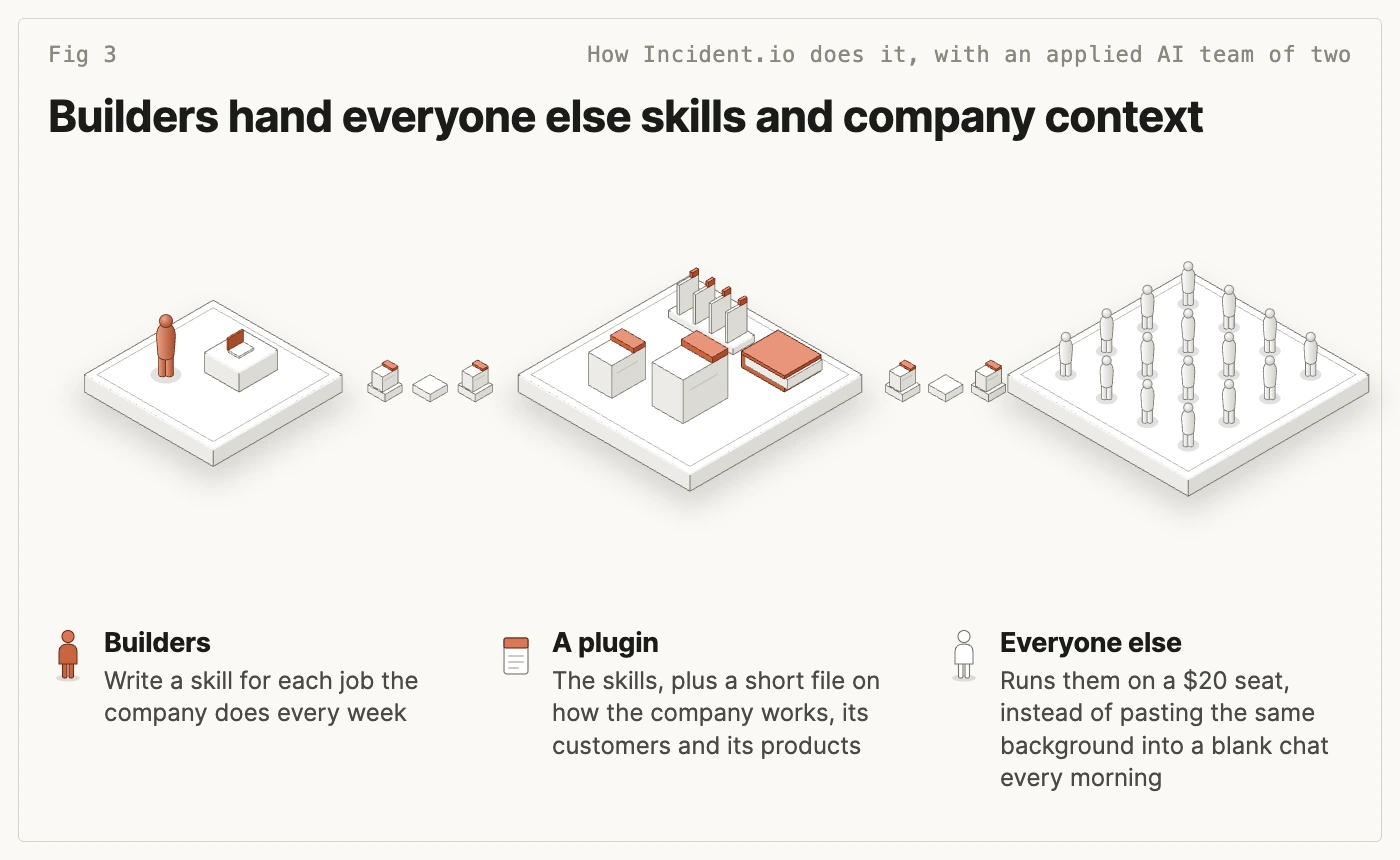
The builders close that gap with two things: skills for the jobs your company does every week, so nobody rewrites the same long prompt, and a short file on how your company works, its customers and its products, which Claude loads automatically instead of searching your whole Notion or Google Drive.
Incident.io (about 200 people) does this with an applied AI team of two. They bundle skills and curated knowledge into plugins that reach every employee within an hour or two of a change. Incident.io is on Claude Enterprise, and plugins work on the Team plan too. Tom Ashworth, who leads applied AI there, explained the setup in a talk to Agent Accelerator learners in May 2026.
Give AI-native users a $100 seat too
Some people use Claude for most of their working day: long research in Cowork, hours of work on documents, the builders' agents running on big jobs. In James's experience they need at least $100 a month even with good skills and context, so put them on Premium from day one. Plan on about 20% of the company. You'll find them among the people who already pay for Pro or Max on their own card, and the Standard users who keep running out after their setup has been fixed.
Don't cap a builder whose work colleagues would fight to keep
Some builders will cost well over $100 a month. To decide whether that's worth it, ask the people who use what they built: "How would you feel if we switched this off?" Sean Ellis, who created this test for products, found the threshold is 40%: products that grow almost always have at least 40% of users who'd be "very disappointed" to lose them.
Incident.io ran that survey on its Claude tooling. About 90% said they'd be very disappointed, and one person wrote "if you took this away from me I would cry and then I'd quit". Incident.io hasn't given its applied AI team a hard spending limit. One of its sales agents costs about 50 cents a run, which Tom Ashworth said doesn't matter when a deal worth $50,000 a year is on the line.
Ask the users, not the builder, and check the agent does real work that recurs every week and that someone owns. When an agent passes, give its builder a generous extra-usage limit and review it each quarter. Tie the bigger budget to that job, such as the month-end reconciliation agent the finance team relies on.
Two common mistakes show why. At one US finance company of about 2,000 people, the VP of AI described starting with a flat $100 limit per person on Claude that people used up in three to five working days, and said business-critical work needed much more. And Amazon switched off an internal leaderboard that ranked staff on their use of its AI coding tool, after a senior vice-president said it pushed up costs: people were padding their usage to climb it.
Team seats include usage; Enterprise bills every token on top
Team seats cost $20 or $100 a person
Anthropic's published prices in US dollars, before tax:
| Plan | Per person, billed annually | Billed monthly | What the price includes |
|---|---|---|---|
| Team, Standard seat | $20 | $25 | A seat allowance, more than Pro |
| Team, Premium seat | $100 | $125 | Five times the allowance of a Standard seat |
| Enterprise | $20 seat, plus usage | Seat billed annually; usage as you go | No allowance: everything is billed at API rates |
Team covers 2 to 150 people, and you can mix seat types. Past 150 people you need Enterprise, which has a 20-seat minimum online and 50 through Anthropic's sales team. In the UK, Anthropic's Team prices are £18 a Standard seat and £90 a Premium seat a month billed annually, including VAT. Enterprise bought online is billed in US dollars only; other currencies need a plan through the sales team. The Claude pricing calculator shows all three currencies.
Pro, Max and Ultra are personal plans paid by one person, so the company can't manage them or set limits on them. If company seats run out too often, expect people to buy Pro on their own card, where you can't see or limit what they use.
The same $29 buys a usable seat on Team and very little on Enterprise
In October 2026, Accenture told many of its employees it would now spend only $29 a month per person on Claude. Some had been spending as much as $1,000 a month.
On Team, use inside a seat allowance "isn't metered in dollars", in the words of Anthropic's cost documentation. The allowance resets on a rolling five-hour window and a weekly one. So $29 on Team is a $20 Standard seat with $9 of extra usage for when someone runs out.
On Enterprise, Anthropic's help centre says "Enterprise seats don't come with an individual token allowance": the $20 seat includes no usage, and everything is billed at API rates (1.1 times those rates if you keep processing in the US). So $29 on Enterprise is the $20 seat and $9 of actual use, which a builder can use up quickly. Before copying anyone's per-person figure, check which plan it was set for. To compare the two plans for your own team, use the Claude Enterprise pricing calculator.
Budget $52 to $80 a person a month on Claude Team
Here's the mix once about 20% of the company are builders, on Claude Team, billed annually and before tax:
| Who | Share of the company | Seat | Extra-usage limit each |
|---|---|---|---|
| Builders working on agents and workflows | 15% | Premium, $100 | None to start |
| Builders using Claude Code | 5% | Premium, $100 | $150 to $250 |
| AI-native users | 20% | Premium, $100 | None to start |
| Everyone else | 60% | Standard, $20 | $25 |
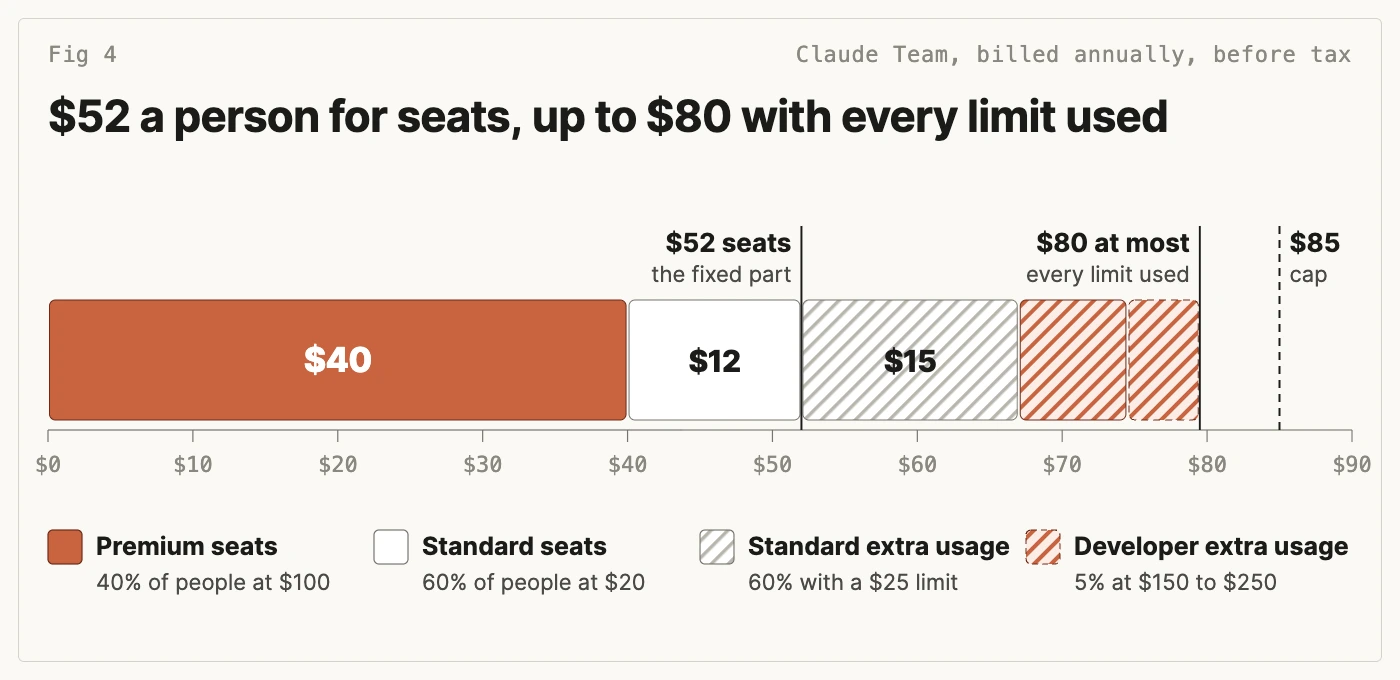
Averaged over the company, seats come to $52 a person a month: 40% of people on $100 and 60% on $20. The extra-usage limits add $22.50 to $27.50 a person: $7.50 to $12.50 for the developers and $15 for everyone else. So with every limit used, the most you'd pay is $80 a person. The 40% on Premium are about three-quarters of the seat cost.
The same shares at different company sizes:
| People | Seats a month | Every limit used | Organisation cap |
|---|---|---|---|
| 20 | $1,040 | $1,590 | $1,700 |
| 50 | $2,600 | $3,975 | $4,250 |
| 100 | $5,200 | $7,950 | $8,500 |
| 150 | $7,800 | $11,925 | $12,750 |
Team stops at 150 people. Past that you're on Enterprise, where seats include no usage, so work it out in the Claude Enterprise pricing calculator. For your own size and mix on Team, use the Claude pricing calculator.
In month one, with 8% of the company as builders and the AI-native users on Premium from the start, seats come to about $42 a person.
For finance, set the organisation-wide extra-usage limit about 20% above what you planned: $33 a person, against the $27.50 of limits you've set. With seats fixed at $52, the most the company can pay in a month is $85 a person, the cap in the table. When a builder reaches their limit on real work, the person in charge raises it and logs why.
Piloting first? Monthly billing costs $25 a Standard seat and $125 a Premium seat, so the same seats come to $65 a person a month. Run a month or two on monthly billing, then switch to annual once the mix settles.
Spending limits keep the bill predictable
How to set an extra-usage limit for each person on Claude Team
Extra usage on Team runs on usage credits, billed at standard API rates. Anthropic's guide has the full steps:
- In Organization settings, open Usage and switch on usage credits.
- Set a monthly limit for the whole organisation.
- Set a limit for each person under the spend limits by user.
When someone goes past their limit, Anthropic says they can't use Claude, Cowork or Claude Code again until the next billing period, or until an admin raises the limit. If you never switch usage credits on, anyone who uses up their seat allowance waits for it to reset. The usage page shows each person's spend so far this month, which is what you'll look at when a builder asks for more. On Enterprise you can also set limits for groups, so engineering can have a bigger budget than everyone else.
Before you raise anyone's limit, check they aren't wasting tokens
James pays £200 a month for Claude and rarely reaches his limits. In his experience, people who keep running out usually have one of these:
- A bloated CLAUDE.mdThe instructions file Claude reads at the start of every conversation, grown long enough to cost tokens every time.
- Long answers nobody asked forOutput costs five times as much as input: $10 against $2 per million tokens on Sonnet 5.5.
- One enormous conversationA chat that never gets restarted, so every new message carries everything before it.
Output is what Claude writes back, and Anthropic's API pricing charges five times as much for it as for input on Sonnet 5.5. At those rates, 100,000 input tokens cost $0.20 and 100,000 output tokens $1.00.
Before you raise anyone's limit, have them run the free stop wasting tokens prompt. It reads their setup and applies ten of fifteen token-saving fixes, and changes nothing until they reply APPLY. Developers can also run a cheaper model in Claude Code for routine work; the OpenRouter setup keeps their Claude plan working alongside it.
Roll it out over six months
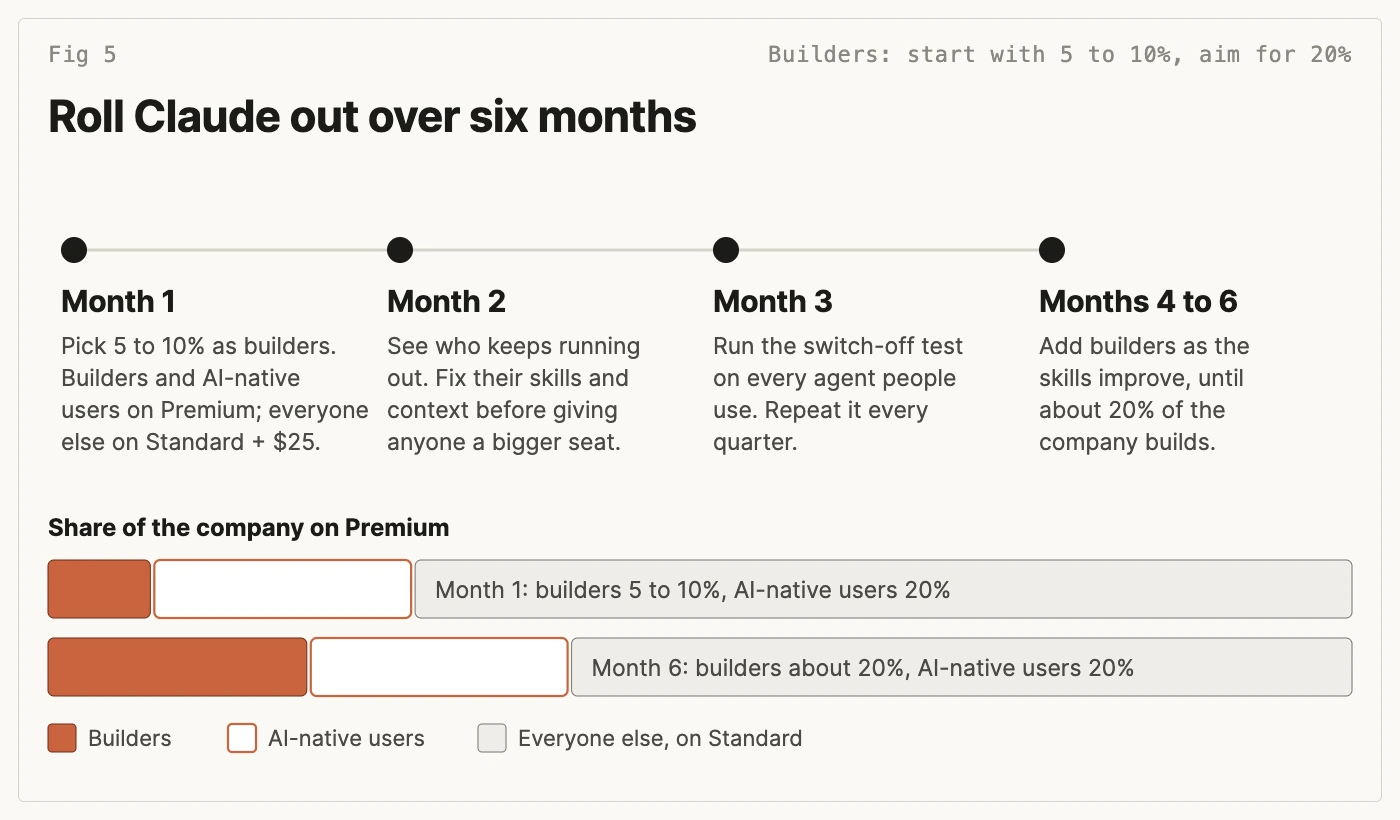
- Month one. About 5 to 10% of the company as builders on Premium, the AI-native users on Premium too, everyone else on Standard with a $25 extra-usage limit, and an organisation-wide extra-usage limit in place. Builders spend their time on the jobs that waste the most hours across the company.
- Month two. Look at who keeps running out. A Standard user who runs out every week usually needs better skills or context before a bigger seat. A builder who runs out on real work gets a higher limit.
- Month three. Run the switch-off test for the first time on every agent people use, then repeat it each quarter. Keep the limits of builders whose agents pass, and talk to the ones whose agents don't.
- Months four to six. As the skills improve, everyone else's usage should fall and more people should start building. Add them to the builder list until about 20% of the company are builders.
Three numbers tell you it's working: how many Standard users run out of their allowance each week, how many people use each builder's agents, and spend per builder against the number of agents in daily use.
What CEOs ask about Claude budgets
What share of a company should be builders?
Start with about 5 to 10% and aim for about 20%, which is James's rule of thumb from training teams. The section on starting your first builders above says how to choose them.
Does every employee need a $100 seat?
No. Builders and AI-native users do, about 40% of the company. Everyone else does well on a $20 Standard seat with a $25 extra-usage limit once the builders have given them skills and context. Upgrade people who keep running out only after their setup has been fixed.
Should we cap usage for our heaviest user?
Ask the people who use what they've built. If at least 40% would be very disappointed to lose it, set a generous limit and review it each quarter. If nobody would notice it gone, a lower limit, or a conversation about what they're building, is fair.
We use ChatGPT or Copilot, not Claude. Does this apply?
Yes. On ChatGPT or Microsoft Copilot, give builders the plan with the most usage and everyone else the standard business seat, and set limits the same way. If people use two tools, give the builders the higher plan on the one they build with and keep the second to its cheapest business seat. Context files usually carry over between tools; skills may need adapting. The ChatGPT pricing calculator and Copilot pricing calculator work out the seat costs.
James runs Claude workshops for teams that start your first builders off: each person sets Claude up with their own context, and everyone leaves with agents getting work done for them. He checks your plan on the scoping call and sets the exercises to match. To see what that looks like in practice, read how Huggg, Koru Kids and Connectd trained their teams to build agents, or put your first builders through the four-week Agent Accelerator cohort (see the curriculum).
Tagged: claude, team-rollout